Kanban CRM inside Gmail: building the Colossales Chrome extension
How Colossales was designed as a Kanban CRM inside Gmail: pipeline, comments and follow-ups attached to threads, data in Google Sheets.
Context
The Colossales brand already existed. It had been designed for a CRM SaaS project, still in the works, with commercial and international ambitions. The naming and the logo were there. The product still had to be invented.
The question was not “which CRM to build”, but where deals actually live. For a large share of salespeople, the answer is simple: in email. The threads, the attachments, the follow-ups, the back-and-forth. All the commercial context is already in the inbox. The pipeline lives elsewhere: in a spreadsheet, in a heavy CRM, in Slack, or in someone’s head.
Deals live in the mailbox. But which one? The professional market is a duopoly. On detected domains, Microsoft 365 and Google Workspace sit roughly level (about 45% / 44%, TechnologyChecker, August 2026, webmail category). Microsoft tends to lead in large accounts and regulated environments. Google Workspace is stronger among SMEs, startups and cloud-first teams.
I chose modernity: startups and cloud-first. So Gmail and Google Workspace. Not because Gmail is clearly “the” majority mail client (it is not), but because that is where the teams I target already work, and because Sheets, Tasks and Contacts already form the product backbone.
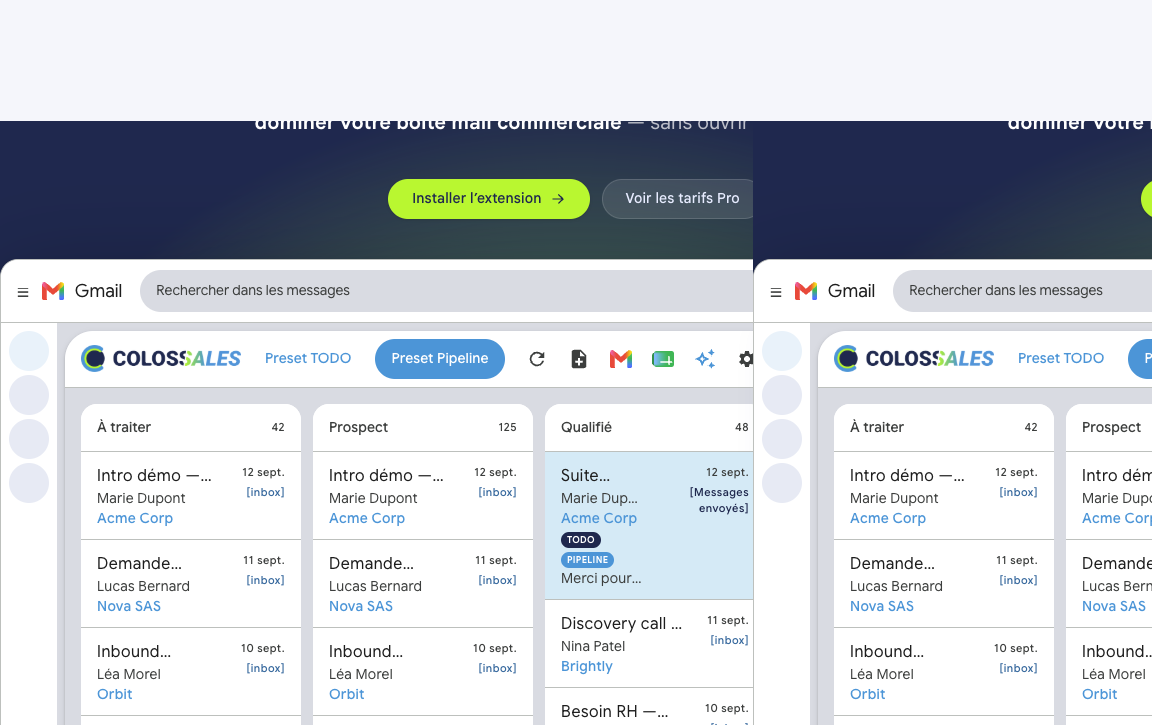
So I designed Colossales as a Kanban CRM that lives in Gmail. Not another tab. Not a form to fill in afterwards. Status, comments and follow-ups stay attached to the thread.
The problem
A pipeline that leaves the conversation
Processing an email already moves a deal forward. Except that the status, the amount and the next action are no longer on the conversation. They sit in a tool the salesperson rarely opens, or in a file nobody updates.
The result: deals that slip between “seen” and “followed up”. Context that stays in one person’s head. A team that duplicates information instead of sharing it.
The friction of classic CRMs
Classic CRMs demand a context switch. You read the email, open the CRM, find the account, update the status, go back to the email. Every tab change is a chance to skip the update. By the end of the day, the pipeline is wrong.
Dependence on a silo
Many CRM tools lock the data in. Hard exports, awkward coexistence with Salesforce or HubSpot, gradual lock-in. For a light tool meant for selling from Gmail, that model is absurd. The data must stay accessible, ideally where the user already works: Google Workspace.
The proposal
I proposed a product that is simple in intent and demanding in execution: attach the pipeline to the email, not the other way round.
Chrome extension, not a Marketplace add-on
Colossales is a Chrome MV3 extension, installed from the Chrome Web Store. It is not a Google Workspace Marketplace add-on. That choice was operational: clear distribution, a controlled update cycle, Pro billing outside the Store via Stripe on colossales.com.
Authentication goes through Google OAuth. Three useful scopes: Gmail, Sheets and Tasks. The user sees what they authorise. No magic, no back door.
Google Sheets as the backbone
The data (threads, comments, reminders, companies) lives in a Google Sheets workbook created for the account. No opaque proprietary database. The data stays exportable, readable and under control. Colossales can coexist with Salesforce or HubSpot: it is not a forced replacement, it is an operational layer attached to the inbox.
That choice also meets a trust requirement. A salesperson who pipelines deals needs to know where the data lives. Sheets is concrete. It is also a safety net: if the extension disappears tomorrow, the workbook remains.
Dual-board: TODO and Pipeline
The same thread can live on TODO (triage), Pipeline (sales), both, or neither. The Kanban status is shared. The card is not duplicated.
- TODO: triage board. Columns for In progress, Waiting, Done. Useful for sorting the inbox before you talk about a deal.
- Pipeline: sales columns, from To do to Won. Amount, close date, probability. That is the Pro core.
This dual-board avoids a classic trap: forcing every email into a sales funnel. Some threads are admin. Some are sales. Some are both. The tool should follow reality, not impose a process.
Contacts, companies, deal memory
Under the conversation, the contact card is enriched through the People API. Job title, phone and photo on Pro. One click opens Google Contacts.
The domain is linked to the company. You sell to an account, not to an address. The company name travels with the card. Deal context is no longer only in the salesperson’s head.
Team comments stay on the thread, indexed in Sheets. Docs and Sheets for the deal attach to the thread. Reminders sync with Google Tasks: “I’ll follow up on Friday” no longer lives on a sticky note. On Pro, an action log records who moved the deal, and when.
Interface and assistant
The board, the panel and the comments follow Chrome’s language. 55 languages, no setting to choose. The tool adapts to the environment, not the other way round.
On Pro, a one-click deal analysis uses a local AI Studio key. Suggestions for amount, close date and probability. A Gemini Gmail subscription is not enough for that: the key stays with the user, the analysis runs on demand.
What was delivered
The user journey comes down to four moves.
- Install: Chrome extension, Google OAuth, two minutes.
- Sync: inbox, sent and archives become Kanban cards. Free: 30 threads. Pro: 100+.
- Triage: TODO board, comments, reminders. Hot deals rise to the top.
- Pipeline: Pipeline preset, deal fields, companies, assistant, sharing, history. You grow without changing tools.
Free / Pro boundary
| Free | Pro | |
|---|---|---|
| TODO board, comments, Google Tasks reminders | Yes | Yes |
| Thread sync | 30 | 100+ |
| Pipeline preset (dual-board, columns from To do to Won) | No | Yes |
| Deal fields (amount, close date, probability) | No | Yes |
| Companies (domain link, create and attach an account) | No | Yes |
| Contact enrichment (job title, phone, photo via People API) | No | Yes |
| Deal assistant (one-click analysis, local AI Studio key) | No | Yes |
| Docs / Sheets attachments on the thread | Yes | Yes |
| Team sharing (Workspace colleagues on the card) | No | Yes |
| History / action log on the thread | No | Yes |
Public pricing: founder rate at €3/month (or €30/year) for as long as the subscription stays active without interruption. Pro at €12/month or €99/year. Team at €9/seat/month or €89/seat/year. The founder rate is a status, not a temporary promotion.
Results
- Product in production at colossales.com
- CRM inside Gmail: pipeline, comments and follow-ups attached to threads
- Data in Google Sheets: no silo, coexistence with an existing CRM possible
- Chrome MV3 extension: Store distribution, Stripe billing outside the Store
- Dual-board TODO / Pipeline: triage and sales on the same thread, without a duplicated card
- 55 languages: interface aligned with Chrome
- Usable Free offer from install, Pro for the full sales pipeline
FAQ
Does Colossales replace Salesforce or HubSpot?
No. Colossales coexists with an existing CRM. The deal pipeline lives on the Gmail thread. The data stays in Google Sheets. The tool is for salespeople who sell from their inbox, not for teams that need a full enterprise CRM.
Where is the data stored?
In a Google Sheets workbook created for the account: threads, comments, reminders, companies. The Pro subscription is billed via Stripe on colossales.com.
Is it a Google Workspace Marketplace add-on?
No. It is a Chrome MV3 extension, installed from the Chrome Web Store. Pro payment is outside the Store.
What do you get by moving to Pro?
Free covers the TODO board, comments, Google Tasks reminders, Docs/Sheets attachments on the thread and a sync of 30 threads. Pro adds the Pipeline preset (dual-board), deal fields (amount, close date, probability), companies linked by domain, contact enrichment (job title, phone, photo), the deal assistant via AI Studio, Workspace team sharing, the action history and a wider sync (100+).
What this project shows
A useful sales tool is not necessarily one more CRM. Sometimes it is putting the pipeline back where the work already happens: in the inbox.
Colossales starts from a simple observation. If the salesperson does not update the CRM, it is not always unwillingness. Often the tool is too far from the real gesture. Attaching the Kanban to the thread, storing in Sheets, billing outside the Store: those are pragmatic choices, not a catalogue.
The product is live. You install, sync, triage, pipeline. See colossales.com.